Chronicling my experiences with with Droid SmartPhones
Affiliate disclosure - Please note that some of the links on this webpage are affiliate links. This means that if you click on one of the links, I may receive a small commission. This helps, to a small degree, to support my website and make free content. If there are any products mentioned in the context of my webpage, then I have actually used them. Thank you for your support!
2009, December - the logic behind the Android decision
In December 2009, my New Every Two with Verizon Wireless was available for me to take advantage of. I decided to get an HTC Droid Smart Phone. The decision between the HTC and Motorola models was an easy one for two reasons - firstly, the price is lower and secondly, the HTC model has no moving parts, like the Motorola version has. I have always seemed to have issues with flip phones, so the HTC softkeys were a better option for me.
One pitfall of my HTC Droid is that it only supports apps being installed into the phones base memory, which is not all that large. Regardless of the fact that I have an 8GB card installed, that is not usable for the installation of apps. So, as soon as my current new-every-two plan expires in November 2011, I will be switching to a newer Droid and retaining the HTC for use as a WiFi-enabled mini-tablet.
I have decided that my next smartphone will be a Droid X (preferably with the 16GB card). It provides 3-user MiFi capability. Because of that capability, I will be able to ditch my MiFi and its associated monthly expenses.
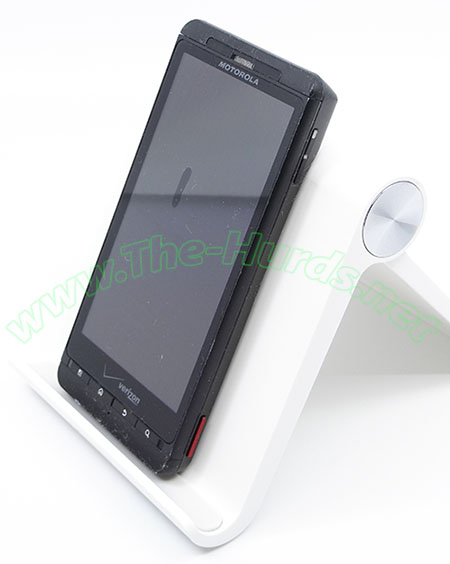
Motorola Droid X MB810, 2011
The Motorola Droid X, was released in July 2010 and featured a 480x854 pixel resolution display. It did not have a selfie camera, but had an 8 megapixel autofocus camera. It also had a built-in FM radio. The vertical 'smudge' visible on this photo is not permanent; it is caused by the battery swelling and pressing the display screen against the digitizing layer. Remove the battery and the pressure stops and the screen displays as expected. Original Motorola replacement batteries are still available from Amazon for this phone.
The cellphone/tablet stand that you see in these photos is my favorite so far. It was an Amazon find and I love the adjustability of the angle and the cleanness of its look.
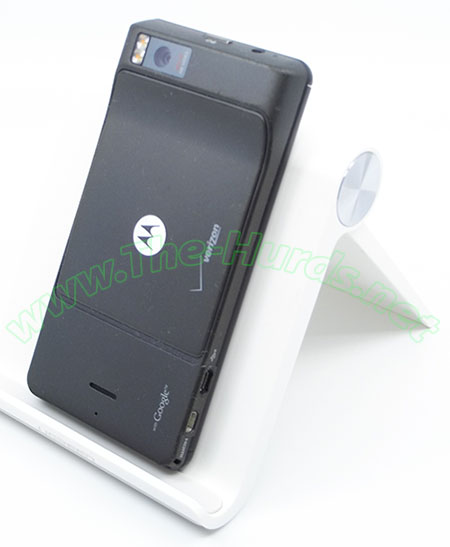
Motorola Droid X MB810, 2011
I still charge and ocassionally use this phone for its GPS capabilities, as a backup, when hiking and to geotag photos taken with my Nikon D100, which does not have geotagging capabilities. More specifications about this phone can be found at GSMarena.
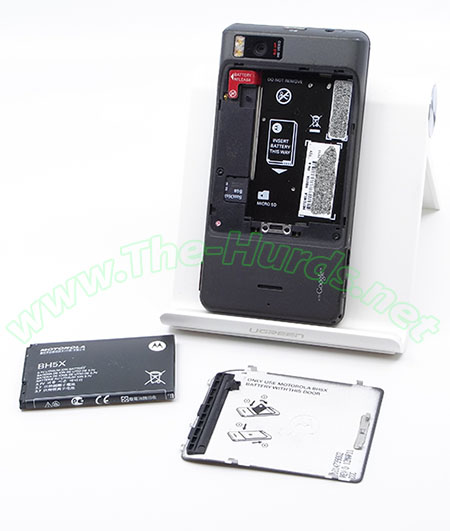
Motorola Droid X MB810, 2011
In April, 2011, I went ahead and upgraded to the Motorola Droid X SmartPhone. I feel it was a good move, but I am disappointed that in order to utilize the MiFi function, you need to not only have the standard phone and data plans, but you need to acquire an additional data plan.
Motorola Android Bluetooth Keyboard
This keyboard is Motorola's part number SJYN0700A. At some point in time, I purchased Motorola's Bluetooth Wireless Keyboard. This keyboard was and still is awesome. Even in late-2020, this keyboard still gets use; functioning just as well on my newest Motorola Moto-series cellphones. It also works with my Nexus Android tablet, which does not get much use these days.
Samsung Galaxy S3 - SCH-1536 16GB 2013-09-05
The Motorola Droid X, was released in 2012 and featured a HD Super AMOLED 720x1280 pixel resolution display. It has a 1.9megapixel selfie camera and an 8 megapixel autofocus camera. The original user-replaceable lithium ion battery for this stored 2,100 mAh of energy. Batteris+ carried a higher-capacity battery, made by Rayovac that is 4,200 mAh; model number CEL11276. It came with a larger back panel to accomodate the battery.
I used this phone, in addition to a Garmin Nuvi 40, to travel cross-country and back in 2015. On the trip west, this phone got extremely hot to the touch and the screen stopped responding to screen taps, etc. I found a Batteries+ in Texas which had the higher-capacity lithium ion battery and purchased it there. I also purchased a generic lithium ion battery charger which has contacts that you adjust for whatever battery you want to charge. As I had also forgotten my charger and spare battery for my Nikon D-100 DSLR, I used this charger (as well as a spare generic D-100 battery also purchased there) to charge various batteries while en route.
Motorola Moto Z Droid, Hasselblad camera Mod and Mophie charge pack (2016)
2017-05-11 purchased a Motorola Moto Play. Very soon after, I sat on both of my phones, breaking the displays of both. Luckily, I DID have Asurion insurance for such a disaster and went two days using my old cellphone to cover my primary cell number. Asurion replaced my Moto Z Play with a Moto Z Droid.
More to come on these subjects
2018, September - Disaster hits my Motorola Moto Z Droid I was demonstrating the Hasselblad camera Mod to a friend of mine who also has a Moto Z Droid. But, when I demonstrated how easy it was to detach the Mod, I dropped my phone, I shattered my display. I no longer had the Asurion protection plan because it is terrible; I sat on my then one-month old phone and they replaced it with one of lower memory and the battery would not even last a full day. Their next replacement worked better, but I still did not get the amount of memory that my original full-priced one had.
I decided to try one of the local cellphone repair services, specifically iFixOnWheelz.com. Alex, their technician came to my office in Arlington and performed the repair in his car, sitting in the parking lot. It took about an hour and cost about $130. That was great, but soon afterwards, probably not related to that repair, the battery in that phone (remember this is an Asurion refurb unit) would not maintain a charge for a full day again. So, I called again upon iFixOnWheelz; they came to my home in southern New Hampshire this time. That was a nicer hit on the wallet, only $40. An hour later, Alex had me back in business.
2020, September - Another disaster hits my Moto Z Droid, the battery and display that were replaced by iFixOnWheelz are now damaged. Who knows what the cause was, it had not been used in months, but the lithium battery had swollen to the point that it cracked the top of the display above the speaker and the screen had nearly totally popped the display off its base. I did not expect the service that I received this time from iFixOnWheelz; Plato drove from where they are based in Cambridge, to my home in New Hampshire, and replaced both the battery and the display at their cost. I was amazed because it was well beyond their one year warranty. iFixOnWheelz definitely stands behind their repairs!
2018 - Motorola Moto Z3
This phone is my normal everyday phone. I actually like it better than my Moto Z4. Most of the reason for that is because the biometrics sensor is set within an indentation on the right-side of the phone. On the G4, the biometric sensor is on the screen. I do not like to have smudges, etc. on the displays of my phones, so the Moto Z3 remains my primary phone. But, the Moto Z4 takes much better photos than the Moto G3 does.
2019-06-27 - Motorola Moto Z4
The timing for this phone was perfect! Best Buy was offering a 50% discount on this phone and it gave me the opportunity to escape from the battery woes that my Moto Z Droid was putting me through. My previous secondary phone was not keeping a charge for very long. XT1650-01 Moto Z Droid 13 megapixel main camera, 4128x3096 pixel resolution, selfie camera, 5 megapixel, 2592x1944 pixel resolution
This webpage last updated on 2021-10-07