Disney+ “Membership Notice” Payment Failed Phishing Scam
A suspicious email claiming that a Disney+ Standard membership payment failed shows several high-confidence scam indicators: an unrelated sender domain, a fake subscription-payment panic hook, misleading authentication clues, and heavy use of Cyrillic lookalike letters designed to make English words appear normal while hiding their true Unicode characters.
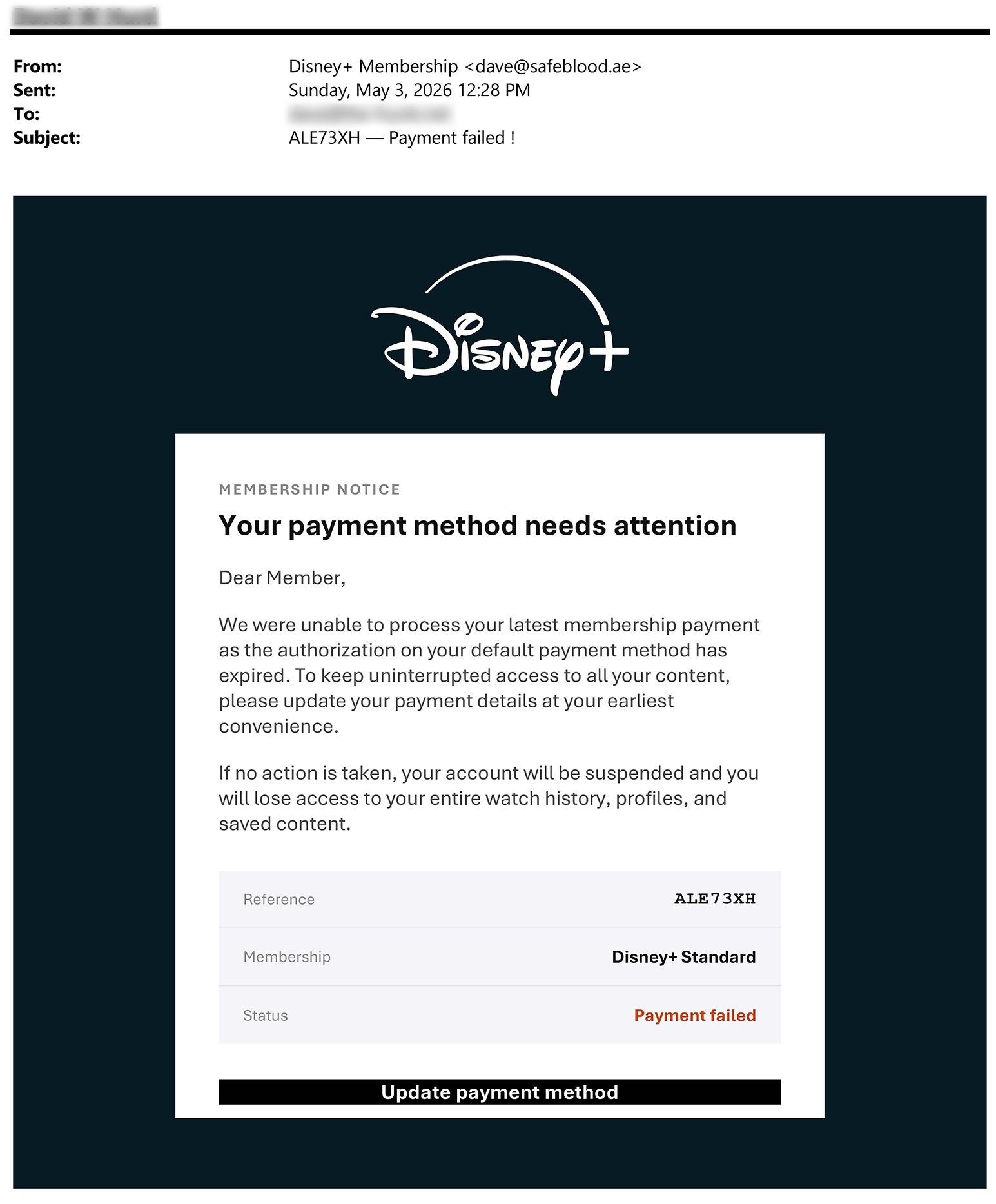
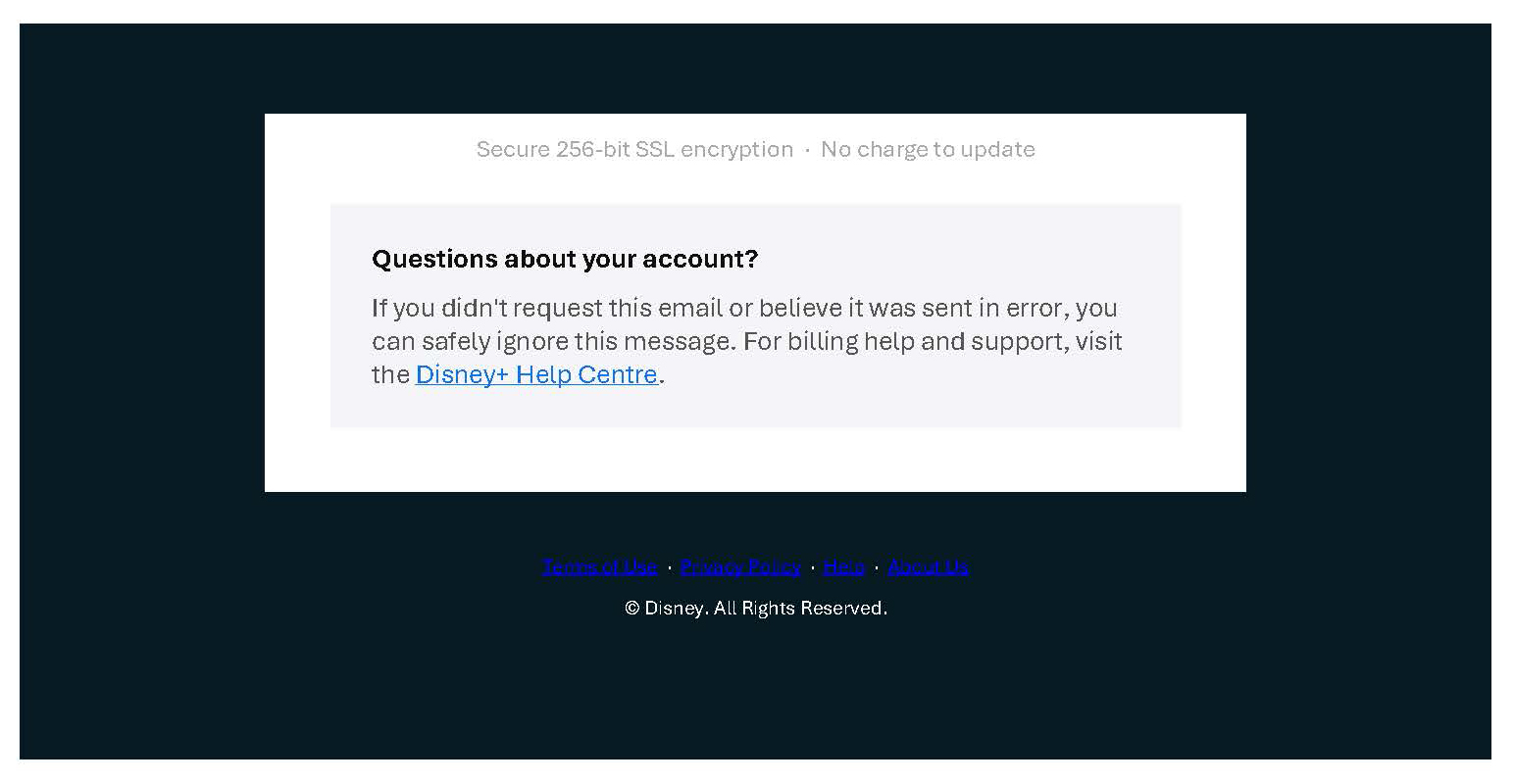
The message claims to be a Disney+ billing notice, but the technical header shows an actual sender address at dave@safeblood[.]ae, not a Disney-owned domain. The display name and subject visually imitate Disney+ and a payment-failed alert, while the text is packed with Cyrillic lookalike letters. That combination strongly suggests intentional deception rather than a normal subscription notice.
Recommended action: do not click the payment-update button, do not reply, do not use the unsubscribe link inside the suspicious email, and do not provide login or payment information. Visit Disney+ only by typing the known address yourself or opening the official app.
Quick Summary
This email pretends to be a Disney+ membership notice. It says the recipient’s payment method needs attention and warns that the account may be suspended unless the payment method is updated. The apparent goal is to push the recipient into clicking an “Update payment method” link and entering payment or login information on a fake page.
The most unusual feature is the text itself. Many letters are not standard English letters. They are Cyrillic characters that look almost identical to Latin letters. This is called a homoglyph or homograph technique. It can fool the human eye and may also interfere with simple keyword filtering, searching, and automated text analysis.
Even though the email header shows a DKIM pass, that pass is for safeblood[.]ae, not Disney. Email authentication for an unrelated domain does not make a Disney+ payment claim legitimate.
Header Analysis
The header evidence does not support the idea that this was a legitimate Disney+ billing notice. It shows a sender and signing domain unrelated to Disney, plus mail infrastructure that does not visually match a consumer Disney billing system.
Important interpretation
The sender domain mismatch is one of the clearest red flags. A Disney+ payment notice should not arrive from a personal-looking address at safeblood[.]ae. A message can pass technical authentication for its own sending domain and still be a phishing email if the message body impersonates a different company.
The header showed X-Spam-Flag: NO. That only means the filtering system did not classify this specific message as spam at delivery time. It does not mean the message is safe, honest, or connected to Disney.
The Unicode Lookalike-Letter Trick
The strongest technical clue is the use of Cyrillic characters that look like English letters. This technique is often described as a homoglyph or homograph attack. It exploits the difference between what humans see and what computers process.
For example, the subject visually appears to say:
ALE73XH — Payment failed !But the suspicious version contains non-Latin characters:
ALE73XH — ???m?nt f??l?d !The two strings look similar, but they are not the same text. Several characters in the suspicious version come from the Cyrillic alphabet.
| Visible Character | Unicode Code Point | Unicode Name | Looks Like |
|---|---|---|---|
| ? | U+0430 | Cyrillic small letter A | a |
| ? | U+0435 | Cyrillic small letter IE | e |
| ? | U+043E | Cyrillic small letter O | o |
| ? | U+0440 | Cyrillic small letter ER | p |
| ? | U+0441 | Cyrillic small letter ES | c |
| ? | U+0456 | Cyrillic small letter Ukrainian/Belarusian I | i |
| ? | U+0455 | Cyrillic small letter DZE | s |
| ? | U+0443 | Cyrillic small letter U | y |
| ? | U+0420 | Cyrillic capital letter ER | P |
| ? | U+041C | Cyrillic capital letter EM | M |
| ? | U+0421 | Cyrillic capital letter ES | C |
A normal Disney+ billing notice has no reason to disguise simple words such as “payment,” “member,” “secure,” or “status” using Cyrillic lookalike characters. The likely purpose is to evade filters, interfere with keyword matching, and reduce the chance that a human reader notices the deception.
Why “DKIM Pass” Does Not Mean Disney Sent It
The header includes a DKIM pass for safeblood[.]ae. That means the email passed a cryptographic check for that sending domain. It does not mean the email was sent by Disney, approved by Disney, or connected to a real Disney+ account.
Email authentication is useful, but it has to be interpreted correctly. A phishing email can authenticate as itself while impersonating a brand in the display name and message body. The correct question is not simply “Did DKIM pass?” The better question is: Did the authenticated domain align with the brand that the message claims to represent?
In this case, the answer is no. The authenticated domain was not Disney.
Likely Risks if the Button Was Clicked
The visible body contains an “Update payment method” call to action. The plain text supplied for analysis did not include the final visible destination of that button, but the message structure strongly suggests a fake payment-update workflow.
A victim who clicked the link might be sent to a fake Disney+ login or billing page. That page could request:
- Disney+ email address and password
- Full name and billing address
- Credit card number, expiration date, and security code
- Phone number
- One-time verification code
- Other personal information useful for identity theft or account takeover
Stolen information could then be used for credit-card fraud, credential stuffing, resale of account credentials, identity theft, or additional targeted phishing.
What To Do If You Receive This Email
- Do not click the button or any link in the message.
- Do not reply to the email. Replying may confirm that your address is active.
- Do not use the unsubscribe link. In suspicious mail, unsubscribe links can be used for tracking or confirmation.
- Open Disney+ directly by typing the known website address or using the official app.
- Check billing from inside the real account rather than from the email.
- Report the email as phishing using your mail provider’s reporting tool.
- If you entered payment data, contact your card issuer immediately.
- If you entered a password, change it from a trusted device and change it anywhere else you reused the same password.
- Enable multi-factor authentication where available.
- Watch for follow-up scams because compromised data can be used for more targeted attacks.
Defanged Indicators From This Message
These indicators are provided for awareness and defensive review. They are intentionally defanged where appropriate.
| Indicator Type | Observed Value | Why It Matters |
|---|---|---|
| Claimed brand | Disney+ | The email impersonates a major streaming subscription service. |
| Subject | ALE73XH — ???m?nt f??l?d ! | The subject uses a fake reference code and Cyrillic lookalike characters. |
| Reference code | ALE73XH | Reference numbers can make fake notices feel transactional and legitimate. |
| Return-Path | dave@safeblood[.]ae | The bounce address is unrelated to Disney. |
| From address | dave@safeblood[.]ae | The actual sender address is unrelated to Disney. |
| DKIM domain | safeblood[.]ae | Authentication applies to the sending domain, not Disney. |
| Observed mail host | jovinus3[.]ch-meta[.]net | The message path does not visually resemble a Disney billing system. |
| Observed IP | 80[.]74[.]142[.]148 | Included for defensive review, not as proof by itself. |
| Call to action | U?d?t? ???m?nt m?th?d | The button text uses lookalike characters and directs the recipient toward payment-data entry. |
Why This Type of Message Can Slip Through Filters
One notable detail is that the message was not flagged as spam by the receiving system. That should not be interpreted as proof of safety. Phishing emails may reach an inbox when they use authenticated but unrelated domains, fresh infrastructure, lightly used sending addresses, or obfuscated text.
The Cyrillic lookalike text may also reduce the effectiveness of simple filters that search for ordinary English strings such as “payment failed” or “update payment method.” A filter looking for the Latin word payment may not treat ???m?nt as the same word.
Reader Lesson: Trust the Account, Not the Email
The safest way to handle any subscription billing notice is to avoid the email’s links entirely. If the notice claims to be from Disney+, Netflix, Hulu, Amazon, PayPal, a bank, or any other service, use a known-good path to check the account. Open the official app, use a bookmark you created yourself, or manually type the address.
If the account really has a billing problem, the real account page will show it. If the account page does not show a problem, the email was almost certainly a lure.
Sources and Helpful References
The analysis above is based on the received email body and header evidence, along with general phishing-safety references. No suspicious payment-update link from the email should be visited.
- FTC Consumer Advice - How To Recognize and Avoid Phishing Scams
https://consumer.ftc.gov/articles/how-recognize-avoid-phishing-scams - Disney+ Help - Suspicious emails and texts claiming to be from Disney+
https://help.disneyplus.com/article/disneyplus-scam-prevention - Disney+ Help - What is phishing and how does it put my Disney account at risk?
https://help.disneyplus.com/article/disneyplus-phising - Palo Alto Networks Unit 42 - The Homograph Illusion: Not Everything Is As It Seems
https://unit42.paloaltonetworks.com/homograph-attacks/ - Google Workspace Admin Help - Email sender guidelines
https://support.google.com/a/answer/81126?hl=en
Social-Engineering Pattern
This message follows a predictable subscription-payment scam formula. It is built to make the recipient act quickly and emotionally.
The fake problem
The email says the payment method needs attention and that the latest membership payment could not be processed. This is believable because many people have expired cards, changed bank accounts, or multiple streaming subscriptions.
The fake deadline
The email threatens account suspension if no action is taken. This creates pressure and makes the recipient more likely to click without inspecting the sender address or link destination.
The fake loss
The message warns that the recipient could lose watch history, profiles, and saved content. This turns a billing issue into a fear-of-loss situation.
The fake reassurance
The phrase “Secure 256-bit SSL encryption” is used to sound safe and technical. A phishing site can still use HTTPS. Encryption does not prove that the site is legitimate.
The scam does not need to convince every recipient. It only needs to catch someone who has a Disney+ account, is distracted, has recently changed payment cards, or is worried about losing access. Subscription-payment phishing is effective because it imitates a routine problem people already understand.